
A design workflow where AI holds the context, I do the thinking: from brainstorm to prototype
Working through a complex design problem means holding a lot in my head. Research synthesis, product metrics, a Slack thread with stakeholder feedback, Figma comments, decisions made in the last iteration. Multiply that across iterations, and it’s hard to keep up.
Most AI tools push toward visual generation. Faster UI, pretty mockups, vibe-coded prototypes. It’s fast, and it looks good. But it skips the hard part. I always thought design was about solving problems.
So what if AI could help me think through the problem instead? Hold all of the project’s context and surface the right piece at the right moment. Something that compounds context over a project’s life. Like a mind palace?

Once set up, I can go from a well-defined problem to a few data-informed code prototypes quickly. Not vibe-coded UI. Concepts grounded in the actual problem and project context. And I’m not using regular AI chat or Projects.
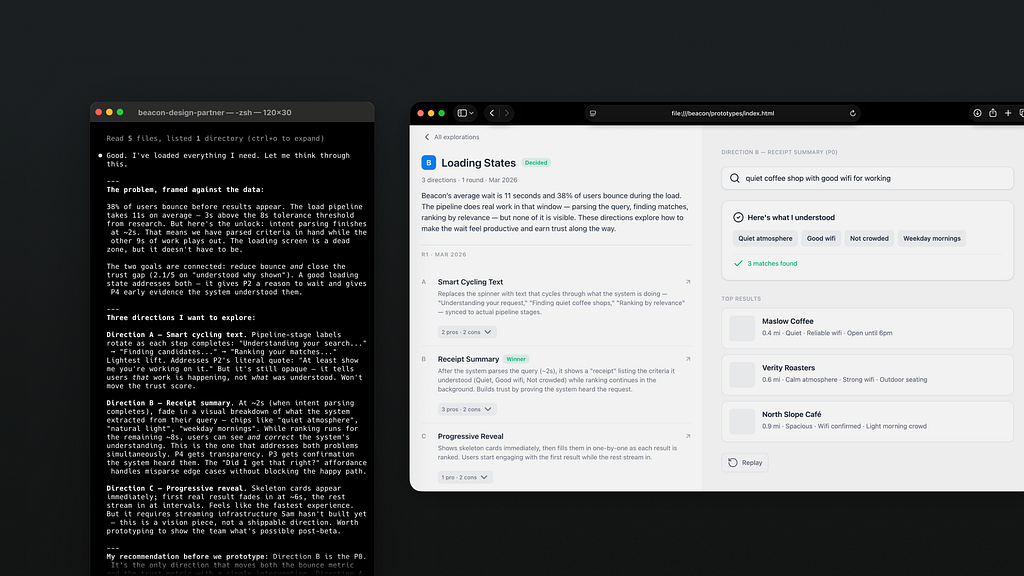
I’ll walk through it using Beacon – a fictional local discovery app with made-up research, personas, and one design problem: users bouncing before the data loads. The data and examples aren’t real. The setup is. Sample project is on GitHub, linked at the bottom.
Giving AI the full picture
Project context is scattered across different documents, tools and people. Research lives in one place, product metrics in another, stakeholder feedback in Slack threads I missed. Every design session starts with manual context reassembly. So I built a memory bank out of it. Then I taught Claude Code to use it.
my-project/
  .claude/ ← skills live here
  data/ ← research synthesis & metrics (I started with this folder!)
  design/ ← per-feature folders (round-1/, round-2/, … for explorations + feedback)
  project-context/ ← frozen project details (PRD, goals, etc.)
  handoffs/ ← eng specs
  prototypes/ ← working HTML prototypes
  design-system/ ← tokens & components
  CLAUDE.md ← project instructions
  MEMORY.md ← persistent context index
CLAUDE.md customizes Claude Code for this project. MEMORY.md is the running index of all context, data, and decisions. Think of it as a table of contents that keeps evolving. When Claude needs information, this file tells it where to look.
design-system/ makes prototypes feel like the real product. My setup is simple: design tokens (spacing, color, typography) as CSS variables. The goal at this stage is validating flows and UX, not visual accuracy. I could wire up this project to my design system code, but setup felt time-consuming.
I store all project information as markdown. They’re consistently formatted so AI can retrieve it better. Raw notes are fine going in. Claude can help shape them. Anything confidential, I obfuscate first.
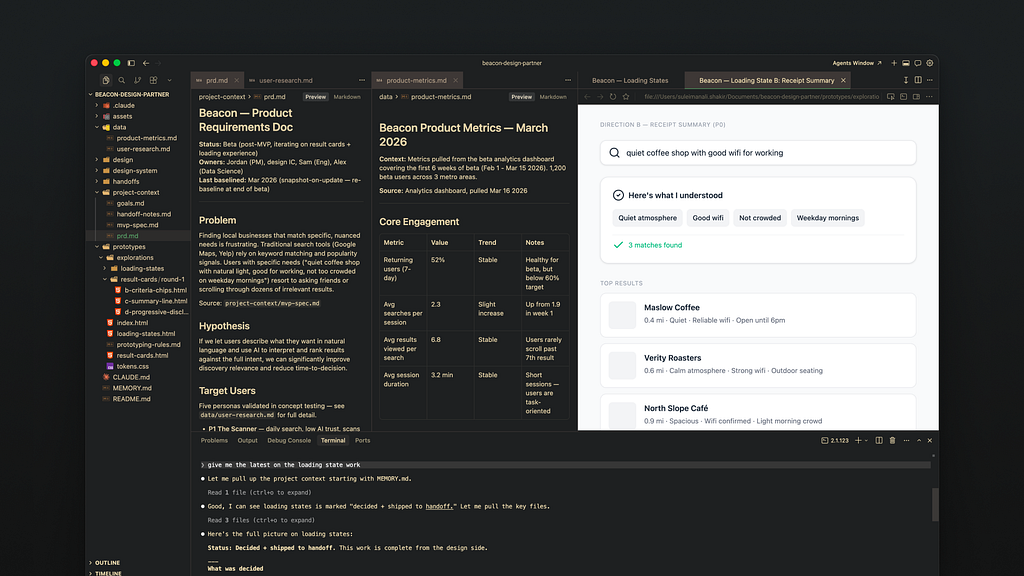
I run Claude Code via Terminal in Cursor. Any IDE showing multiple files works (like VS Code). I need to see the files AI touches. Don’t want any hallucinations creeping in!
The Terminal looks intimidating. But using Claude there feels like regular AI chat with more power. I can open a new Terminal tab and run another Claude instance. Using Claude Code via the desktop app could work too but I haven’t tried it. Recently I’ve been using Warp to manage multiple agents and get notified when they’re done. Pick an approach you’re comfortable with!
Automating my process
Once the project had all its context, I noticed another problem. I kept re-explaining the same workflows: “Read the ticket, check research, give me three directions” every time. So I automated them with Skills.

Skills are documented workflows turned into single commands. Anthropic skills and others are worth using, but creating custom ones tuned to my needs worked best. Here’s what I landed on.
- explore: helps go through an entire design iteration. I give it a problem: a ticket, a brief, or statement and it kicks off an iteration, cross-referencing available data and generates code prototypes for each.
- brainstorm: for working out which directions are worth pursuing
- synthesize: takes new raw data and integrates it correctly into the project. Also helps connect new findings to existing data.
- prototyping: builds self-contained code prototypes grounded in the design system.
- design-partner: highly personalized to how I work. I use it to pressure-test a direction against my own standards and project goals.
Highly recommend taking the time to tweak these skills to your working style, especially design-partner.
Connecting to live data
As projects evolve, new context surfaces first in meetings or tools like Slack, Figma or Linear. I’d rather stay immersed in the problem. So I lean on MCPs (Model Context Protocol) to pull information from these tools. Setup takes time with authentication and permissions. But once running, it stays out of the way.
Linear
When the problem lives in a ticket, I point /explore at it so Claude can gather context, read the latest activity, and also help keep it updated.
Figma
Claude references mocks to generate accurate prototypes. Figma MCP writes to the canvas too which is useful. The more structured the Figma, the better it works. I’ve found great results giving Claude a well-defined, scoped section of mocks versus the entire file link.
Figma Console MCP
Lets my project learn the design system from Figma libraries instead of wiring up a codebase. Extracts richer layer data than a screenshot. If code extraction isn’t an option, this helps get it from your Figma libraries.
Slack
Stakeholder feedback, new decisions, timeline shifts hit Slack before they hit any ticket. Teaching Claude where to look keeps it (and me) current.
All of these are optional. My project started with none of them. I wanted it working on its own first. MCPs came later, as I noticed patterns in my workflow worth automating. More connections means more things that can break so there’s a balance.
In practice
One /explore run is the start, not the finish. Most problems take several iterations. I’ve noticed that the more clear I am, the fewer back and forth I have with AI.
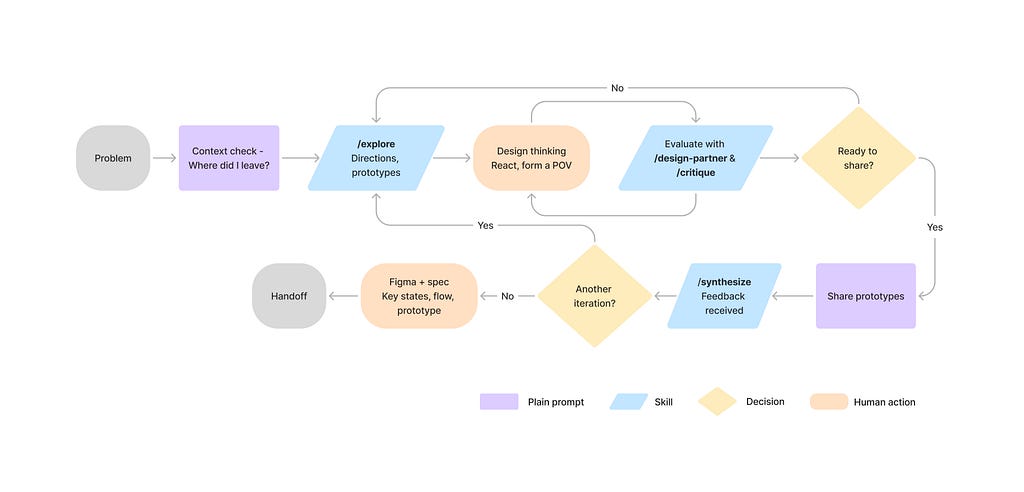
AI surfaces directions I use as starting points. Those proposals are far from sharing or shipping. So I have it surface relevant data points. But I steer what it needs to build. I’ll take over with Figma mocks if needed to help it along.
A typical session. Some commands are skills, some natural language. I talk to it like a collaborator. No re-explaining. It knows the project.
Where did I leave this project? What should I focus on next?

/explore the loading states problem

/design-partner evaluate the latest loading states solutions

/synthesize stakeholder feedback for revision 2: [raw feedback copy-pasted]
My latest iteration for loading states is complete. Post an update. (it'll send a Slack message and Linear comment if MCP works)
Between commands is the actual design work. Sketching, reasoning, spec docs, forming a point of view before I bring Claude back in. This may even mean quick mocks in Figma./design-partner pressure-tests my thinking against the problem.
Once I lock in directions, Claude builds them as code prototypes. Rough on purpose. To align on direction is the goal, not polish. Before anything goes to the team, I validate it against the original problem statement (/design-partner can help).
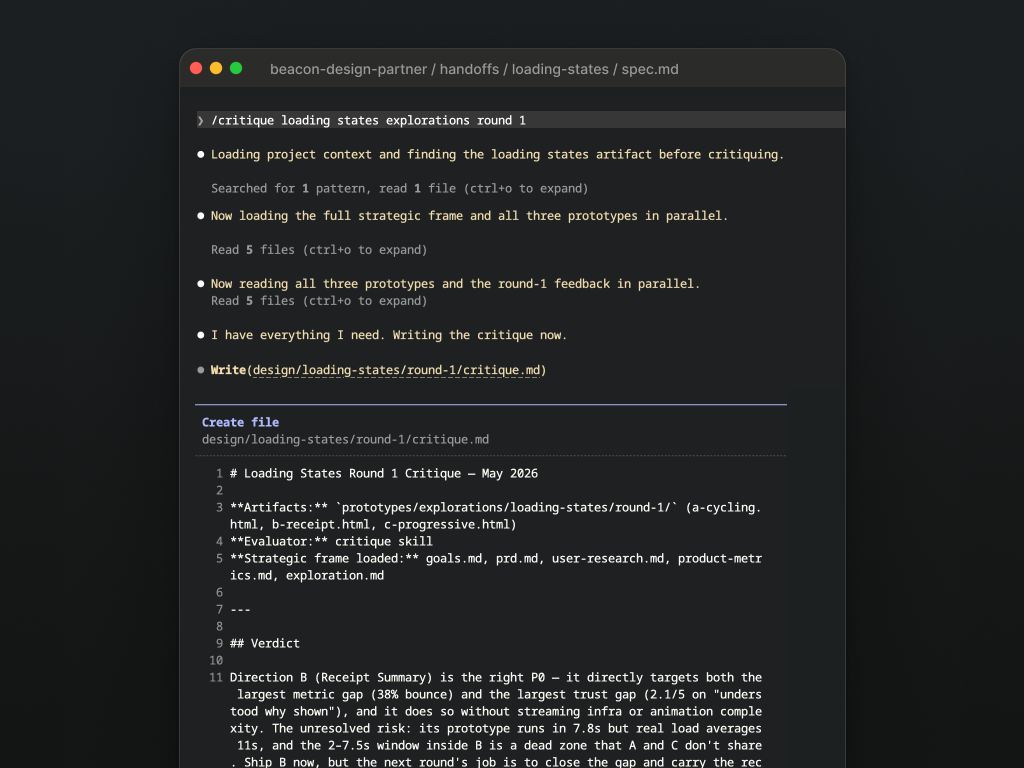
Note: I always check the AI’s sources. It knows to pull only from existing project data but can still hallucinate. When it cites research to justify a decision, I verify the source.
Handoff
Once aligned on a prototype, I design Figma mocks for key moments in the flow. Then I write a spec describing the flow: the steps, with Figma frames for the key ones.
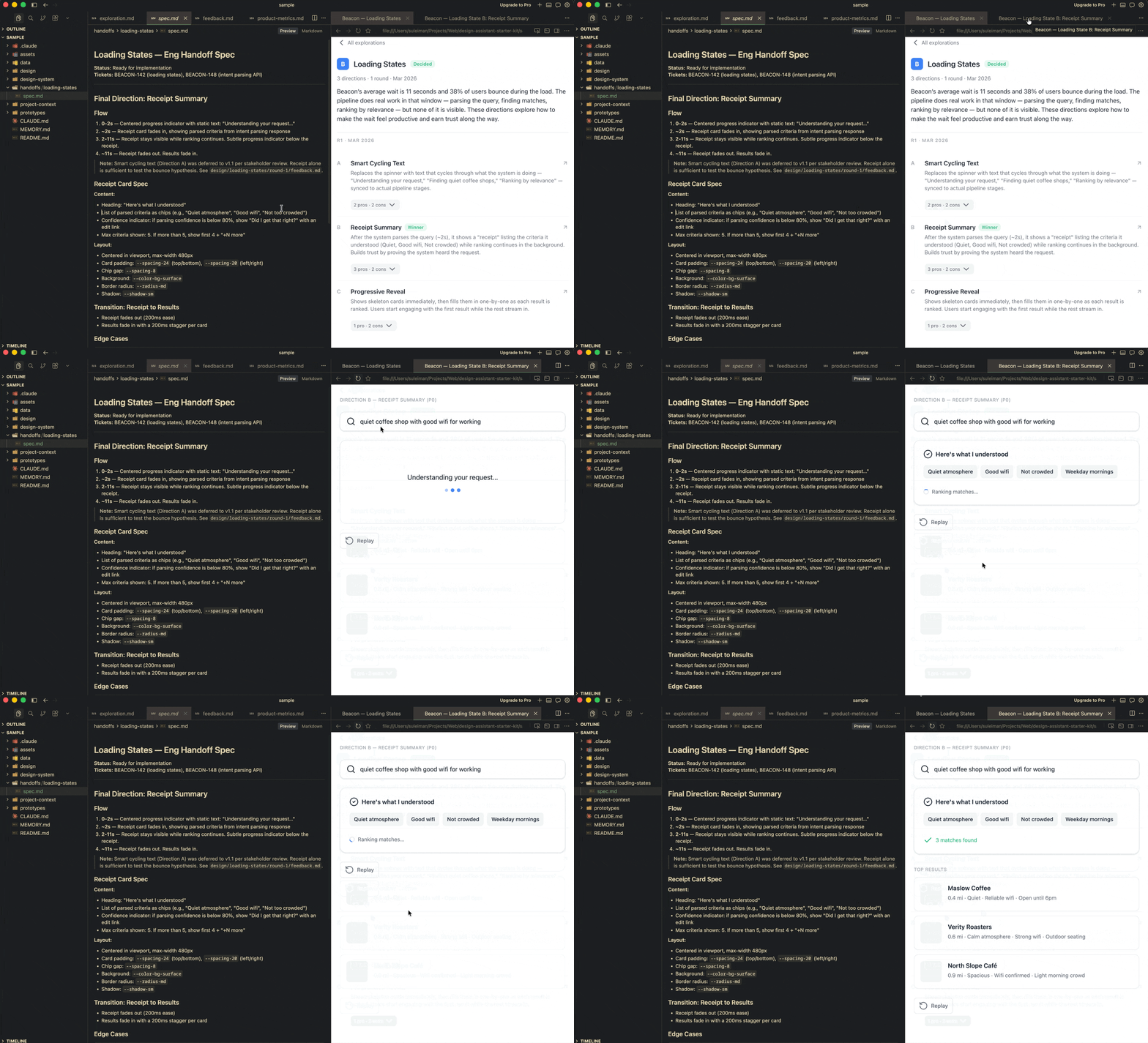
Writing out the solution is also context for AI. It becomes the anchor for everything else. Claude can use it to build a high-fidelity prototype, write a journey map, generate an implementation plan for code. It’s also what stops it from hallucinating, especially with complex flows.
What changed
I stopped starting over. Every session picked up where the last one left off with decisions, dead ends, all of it. I could go from a well-defined problem to clickable prototypes fast. Context switching dropped. I could stay in the problem.
Code prototypes changed the feedback dynamic. Unlike static Figma mocks, they weren’t polished and yet that helped. People stopped picking at visual details and started talking about UX. That’s the conversation I want earlier. Bad ideas die faster too, before I’ve invested much.
I track decisions per round in the design/ folder. No more digging through Figma comment threads to remember why we made a call three weeks ago. Syncing stakeholders stopped feeling like project management. Claude reads the Linear tickets, Slack threads, and latest research. I don’t manually summarize. It already knows.
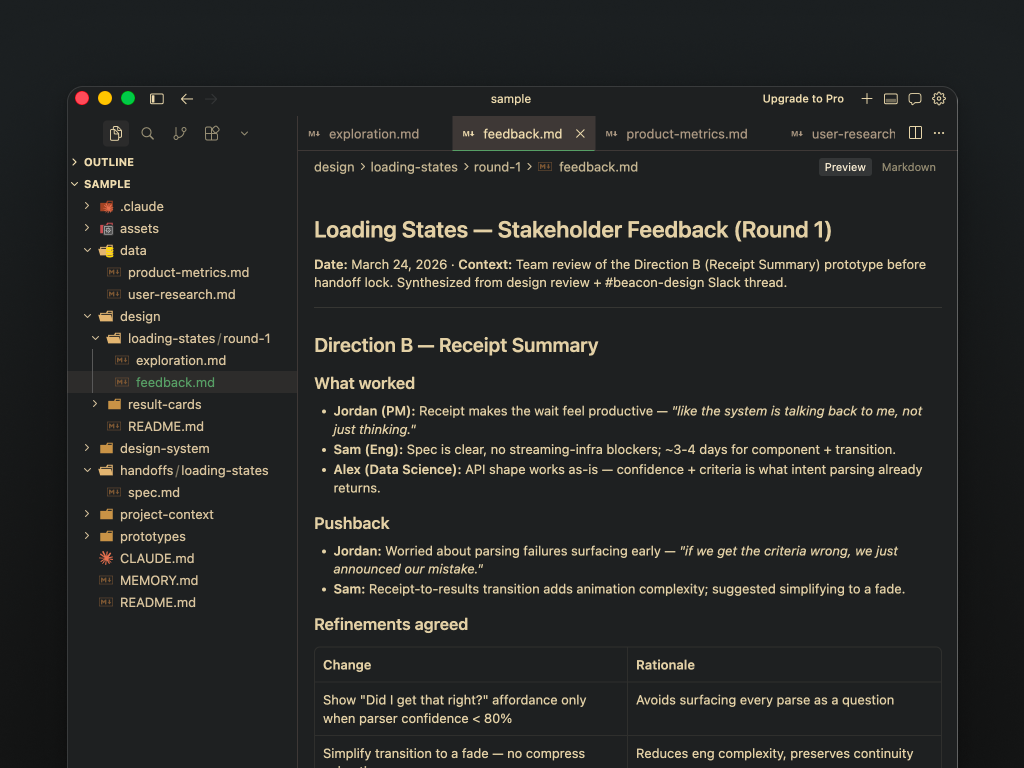
The longer the project ran, the more useful it got. Early decisions became context for later ones.
Where this could go
Prototyping with code components. Once I have a spec, rough prototype, and key Figma frames, Claude writes an implementation plan. I give that to my codebase and it builds a Storybook prototype using the design system. Real code that my engineers could use. I’ve had a fair amount of success with this. Claude Design might make it easier but haven’t spent enough time with it yet.
Proactive context maintenance: Claude is already connected to Linear, Slack, and Figma. Right now I manually feed it updates. I’ve started with a /tidy skill for cleanup and maintenance, but the next step is surfacing a diff: “here’s what’s new since you were last here.” New ticket comments, a Slack thread with an eng constraint, an updated Figma frame. The biggest tax in this setup is keeping context fresh. This would make it passive.
Post-ship feedback loop: The cycle ends at handoff. If I connected analytics, Claude could compare live performance against the original goals. “Bounce during load dropped from 38% to 22% after the receipt pattern shipped.” That closes the loop. I’d know which design decisions worked without pulling dashboards.
Caveats
There’s quite a few, I won’t lie. But the benefits far outweigh the cons for me to even complain.
Upfront investment is real. Organizing project context takes time. I built it piece by piece. The structure is both powerful and fragile. Claude helps maintain it, but I must know what goes in. Incorrect or stale data meant hallucinated outputs.
It doesn’t replace thinking. The project’s greatest strength is recall and synthesis, not outsourced judgment. Claude does the synthesis work: retrieves the research, matches patterns, frames the initial tradeoffs. I do the design thinking. I’ve never shipped a direction without reshaping it because often times its suggestions can be quite terrible. But it does offer a good starting point.
Complex concepts need structured input. A 12-step prototype from a written prompt alone will create drift. Key states mocked in Figma plus a spec document keep AI’s output anchored.
It amplifies blind spots. If my research only covers one persona, every recommendation cites that same source. It makes gaps obvious.
Context grows faster than it compresses. As a project runs longer, the memory bank grows: more rounds, more decisions, more data files. At some point there’s too much for a session to hold cleanly. I manage it by archiving old rounds, keeping MEMORY.md lean, starting new chats often (/clear and /compact were my friends)
Prototype sharing feels rudimentary. The prototypes were interactive and fast to get feedback on. My team was super into it. But sharing a zip file isn’t an elegant Figma link. No annotated comments or canvas sometimes made it tricky to gauge feedback via Slack or Linear comments.
Knowing when to take over. Sometimes it works flawlessly that my jaw-drops. It one-shots my intent perfectly. But sometimes it won’t get the simplest of things right, despite my constant prompts and prayers to the AI gods. That gets tiring. AI gets me 80% of the way. Then I jump to Figma to take it to completion. Otherwise, its diminishing returns. Its also why I’m not chasing high-fidelity concepts with AI (yet).
Closing thoughts
At two months in (at the time of writing), I’m still finding the edges. But long enough to see it work well. Engineering and product were already moving faster. This is how I can keep pace where AI handles the recall, I handle the judgment.
I didn’t need AI to crank out pretty UI. I needed it to hold more so I could think clearer. That’s what this does, most of the time.
Starter kit
Try it yourself on GitHub : https://github.com/Suleiman19/ai-design-buddy
- /sample has Beacon pre-loaded with fake data, research, and skills. Good place to explore before committing to your own setup.
- Run /explore on result cards to see a full iteration kick off.
- Starting fresh on your own project? Delete /sample first.
It’s early and opinionated. Expect it to change.
Building something similar or approaching this differently? I’d love to hear about it! Reach out on LinkedIn.
How I use AI to partner on design problems was originally published in UX Collective on Medium, where people are continuing the conversation by highlighting and responding to this story.


