

Your design system runs on one person’s judgment — AI is about to prove it
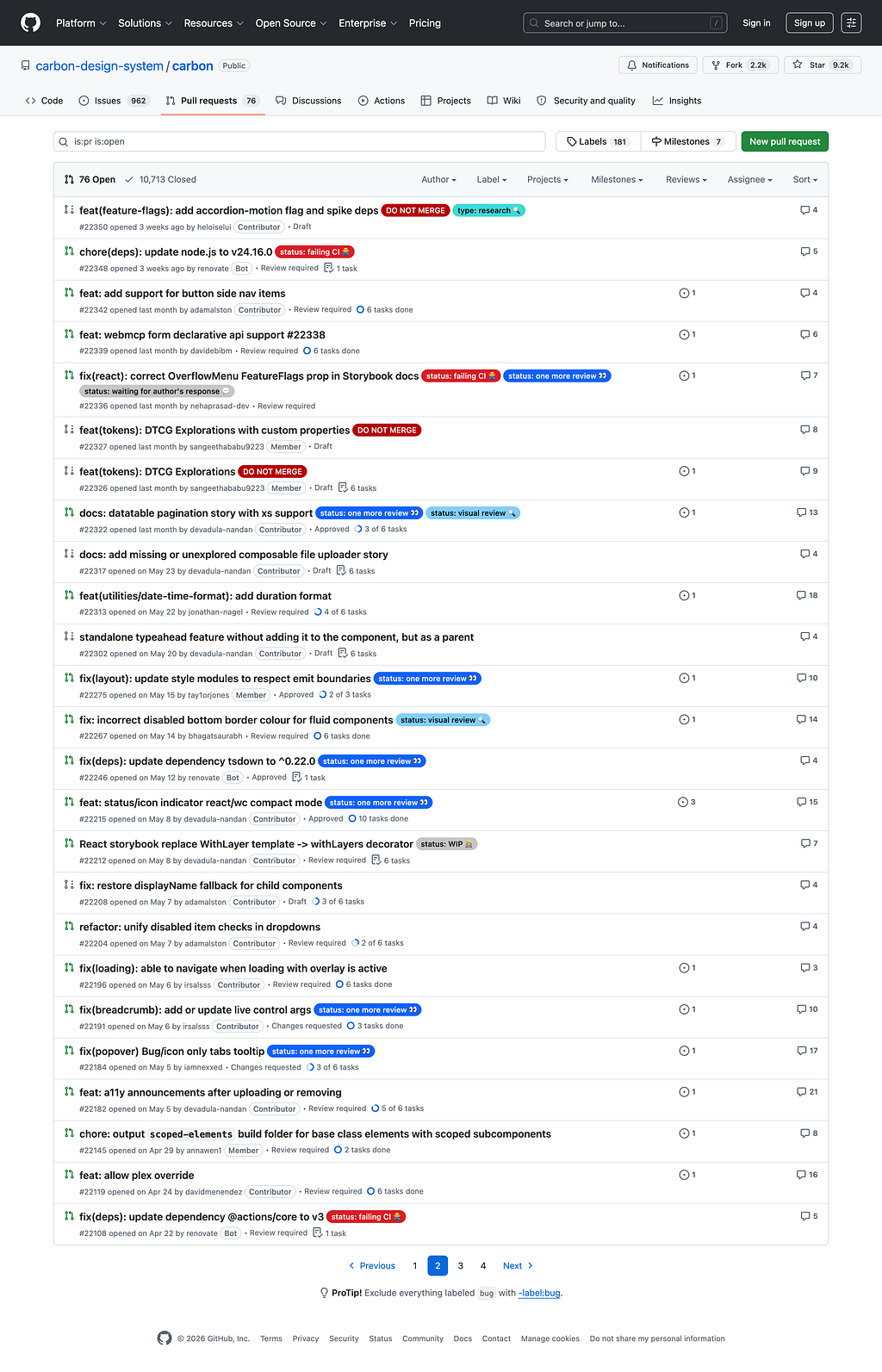
It is 6:40 on a Friday. Nine contributions are waiting for review, and every one of them is waiting on the same person.
One changes a button’s hover state. One renames a token in a way that will break three teams if I miss it. One adds a date picker that looks fine and is completely inaccessible to anyone using a screen reader, and the only way anyone catches it before it ships is if I catch it, tonight, by hand.
This is not one bad Friday. This is the job. When you own a design system, you become the place every change funnels through, and for a long time, I thought that was what good governance looked like: a high bar, held by someone who cared. It took me an embarrassingly long time to see it for what it actually was. The system had a single point of failure, and the single point of failure was me.
AI did not create that. It is about to make it impossible to ignore.
The gatekeeper was always the risk
Every design system that survives past its first year develops a gatekeeper. Sometimes it’s a person, sometimes it’s a small team, but the function is the same: someone reviews every contribution for token compliance, naming consistency, component API sanity, and accessibility before it enters the library. That person is the reason the system stays coherent. That person is also the reason the system stops.
We have a word for this in software, borrowed from a grim joke: the bus factor. How many people have to get hit by a bus before the project is in serious trouble? For many design systems, the honest answer is one.
This is not a new observation, and I want to be careful not to pretend I discovered it. Nathan Curtis at EightShapes has been writing about design system team models, contribution, and the “overlord” pattern for the better part of a decade. He named the central-team-as-bottleneck dynamic years before most of us were running into it. His conclusion then is still the right one: “The only way to keep moving forward is to disperse ownership.” The hard part is that dispersing ownership without dispersing the quality bar is how systems rot.
The data says most of us never solved this. Sparkbox’s design systems survey found that while 61% of teams had a contribution process, only 44% had any governance model, and only 16% tracked a single metric about whether the thing was working. Zeroheight’s more recent report is bleak: stakeholder buy-in dropped from 42% to 32% year over year, and Gartner now places design systems in the trough of disillusionment after they slid off the peak of inflated expectations.
And the people holding it together are tired. The 2024 Tidelift maintainer report found that 60% of open source maintainers have quit or considered quitting, and 61% of unpaid maintainers run their projects alone. Design systems are not open-source projects, but the shape of burnout is identical. The quality guarantee and the single point of failure are the same for an exhausted person.
So when someone tells you AI is going to “transform design systems,” the first question is which part. Because the part that hurts is not the part everyone is writing about.
Almost everyone is solving the wrong layer
Read the current wave of writing on AI and design systems, and you’ll notice they are almost all about the same thing: making your design system machine-readable so AI can build with it. Tokens that an agent can parse. Components with metadata that an LLM can consume. Docs structured as prompts. “AI-ready design system checklists.” “Agentic design systems.” The premise is that the design system is something AI can read, and the work is making it legible.
That work is real. It is also not the bottleneck.
The bottleneck is review. It is the gate, not the library. And the reason almost nobody is writing about automating the gate is that it forces an uncomfortable distinction the machine-readability crowd gets to skip. Review is not one thing. It is two things wearing the same coat.
There is enforcement: is this token bound or hardcoded, does this contrast ratio pass, did this component’s visual snapshot change, does the API match the convention? These are rules. A rule is either satisfied or it isn’t.
And there is judgment: should this component exist at all, should these five variants collapse into one, is this alt text actually meaningful or does it just technically exist, is this pattern quietly lying to the user about what will happen when they click.
From the outside, in a pull request, these look like the same activity. Your senior designer is “reviewing.” But one of them is a machine’s job that a human is doing by hand, and the other is the actual reason you hired a human. Conflating them is the single most expensive mistake in design system governance, and the AI conversation is making it worse because “AI in design systems” is used as a blanket term that covers both without distinguishing between them.
Here is the cleanest way to see the line. It is already drawn, in numbers, in the one domain where everyone agrees a human is required.
Accessibility already drew the line for us
Accessibility is the perfect test case because it is the most defensible reason to keep a human in the loop, and because the human-versus-machine boundary has actually been measured.
Automated tools catch somewhere between 30% and 57% of accessibility issues, depending on how you count. axe-core, the engine under most accessibility testing, states its own ceiling plainly: on average, it finds 57% of WCAG issues automatically. Deque’s coverage report, drawn from thousands of audits, lands at the same 57% by issue volume. The UK Government Digital Service ran its own audit of known issues and found the best tools caught closer to 30 to 40%.
That gap is not a tooling failure. It is the boundary itself. The 57% is enforcement: missing alt attributes, insufficient contrast, unlabeled inputs, the stuff that is mechanically true or false. The other 40-plus percent is judgment: whether the alt text means anything, whether the focus order makes sense, whether the reading order matches the visual order, and whether a screen reader user can actually complete the task. axe will tell you an image has no alt attribute. It cannot tell you that alt=”image” is worse than useless.
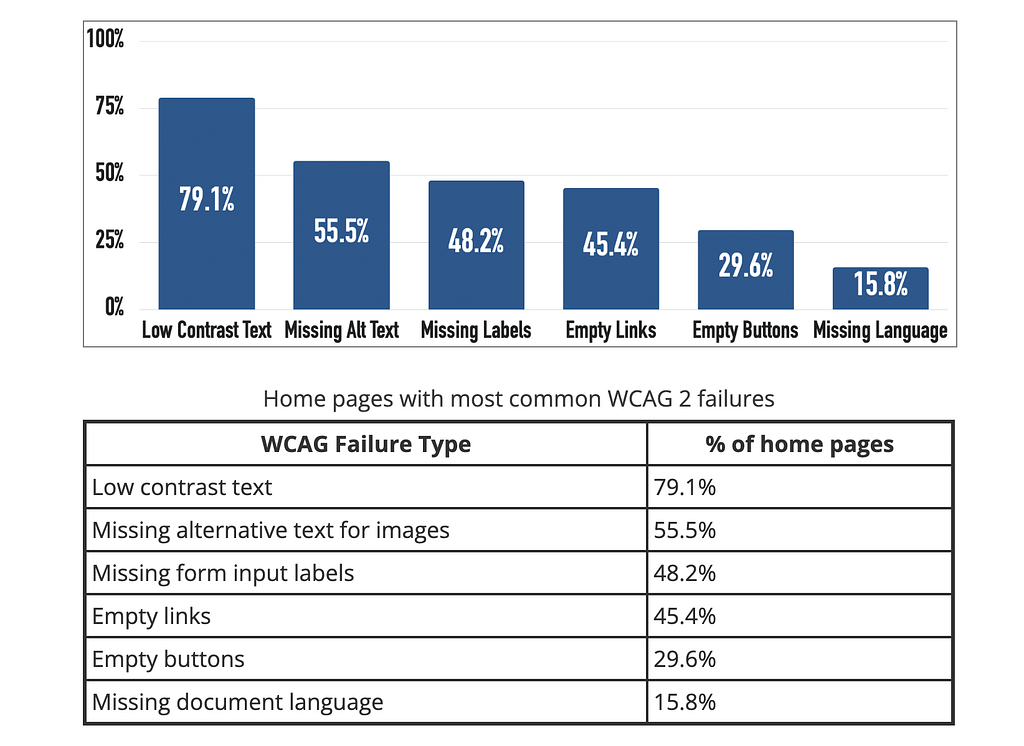
And the scale of the problem is not subtle. The WebAIM Million analysis of the top million home pages found detectable WCAG failures on 94.8% of them, averaging 51 errors per page, with low-contrast text on 79% and missing alt text on 55%. The most common failures are also the most automatable ones. Which means a huge fraction of what your gatekeeper catches by hand, every week, is work a machine catches in 200 milliseconds and never gets tired of doing.
GitHub’s Primer team learned this the expensive way. They wrote about it directly: the belief that accessible components automatically produce accessible products is, in their words, a common misconception. Accessible parts assembled without judgment still produce inaccessible wholes. So the line holds in both directions. Automation is necessary, and it is not sufficient, and the exact ratio is roughly knowable.
The enforcement half is already a solved, boring problem
Here is the part that should make every design system owner slightly uncomfortable. You do not need AI for most of what your gatekeeper does by hand. You need tools that have existed for years and that you probably already half-own.
axe-core has over four billion downloads and runs in CI to fail a build on accessibility violations. Style Dictionary, originally built at Amazon because developers were literally using an eyedropper to find hex values, transforms tokens from a single source of truth across every platform. ESLint and Stylelint rules block raw color values and force token usage at the moment of writing code. Chromatic and Percy catch visual drift no written rule could specify, by diffing snapshots. Storybook’s accessibility addon runs axe on every story.
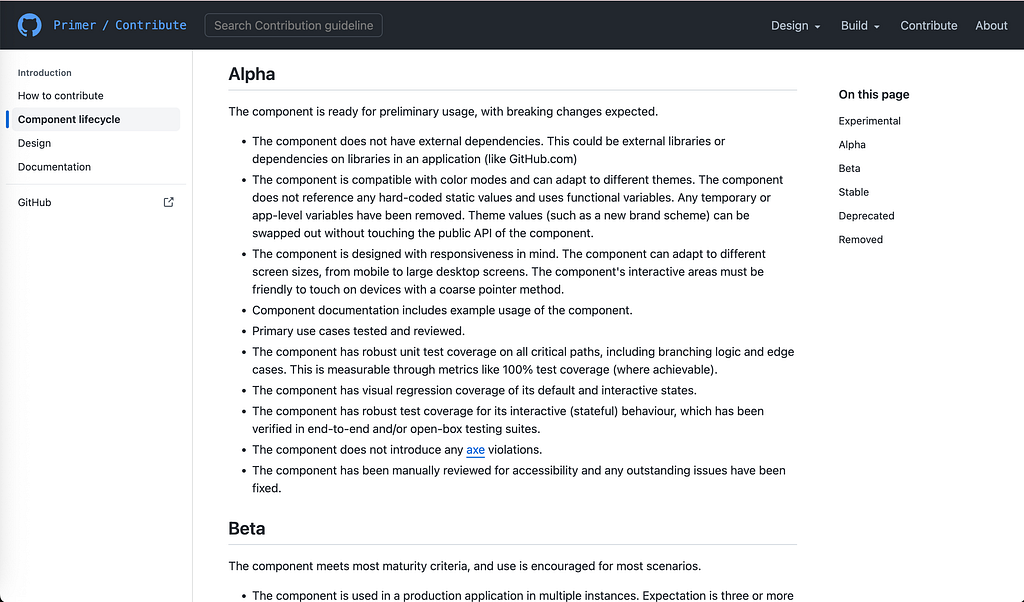
None of this is hypothetical, and none of it is new, and the systems you point to as exemplars already run it. Primer’s component lifecycle requires, as early as the Alpha stage, that a component carry visual regression coverage, pass axe with zero violations, and clear a manual accessibility review with outstanding issues fixed. The automated check and the human check sit one after the other in the same list. Both.
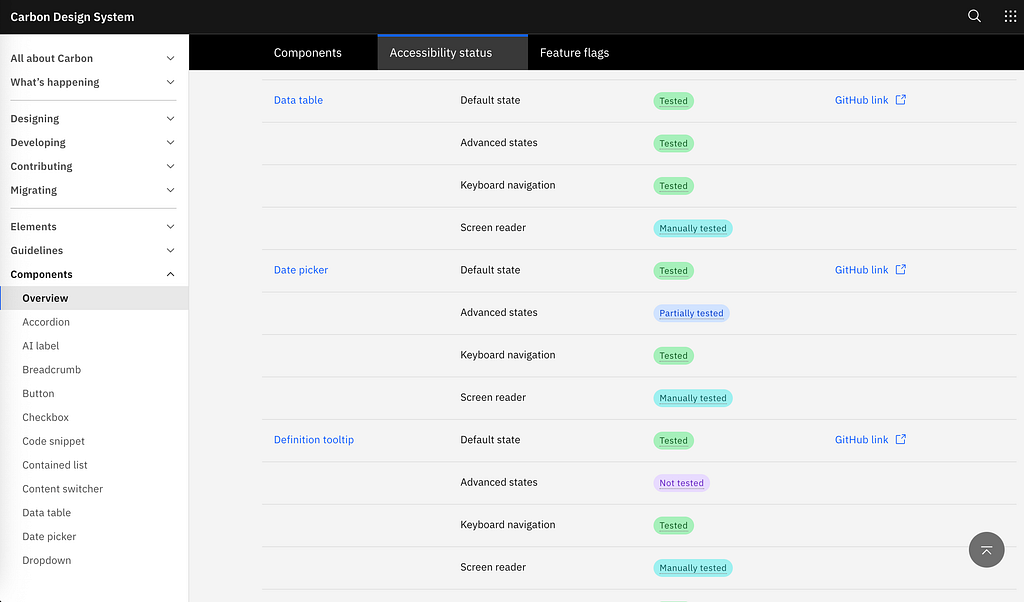
IBM Carbon runs automated accessibility verification on every change to the codebase and publishes a per-component status matrix anyone can read. Adobe’s React Spectrum runs the same automated pipeline for the core team and every outside contributor. The GOV.UK Design System wires jest-axe into deployment and still requires a manual audit before public beta.
The pattern is the same everywhere the system is actually good: machines hold the enforcement floor, humans spend their attention on the ceiling. The line is not a compromise. It is the design.
So if your most experienced person is still manually eyeballing contrast ratios and grepping for hardcoded hex values on a Friday night, that is not craft. That is a machine’s job, performed by a human, at the price of a human. I argued in a previous piece that AI is exposing a craft crisis in design. This is the governance version of the same exposure. Automating enforcement reveals how much of what we called “rigor” was just unautomated labor we never got around to scripting.
Where AI actually earns its place
If enforcement is already handled by deterministic tools, what is AI for? Not the floor. A few specific feet up the wall, in the gray zone where a rule cannot be written but a pattern can be recognized.
This is the genuinely useful frontier, and it is narrower and more boring than the hype admits. FigmaLint audits components for things a hard rule struggles with: naming quality, plausible accessibility problems, and it generates the handoff documentation nobody writes. AI accessibility copilots layer on top of axe to flag the probable experiential failures, the alt=”image” problem, and explain them in language a contributor can act on. Figma’s MCP integration can report drift between design tokens and the code that implements them.
Romina Kavcic frames the realistic version better than the hype does. The first useful agents, she writes, will not be magical design partners. They will be boring. They will detect drift, update docs, open migration pull requests, flag accessibility issues, and find token misuse. “Boring is where trust starts.”
That is the honest shape of “AI removes the manual check one person relies on.” Not a replacement for the gatekeeper’s judgment. An extension of enforcement, a few points up the curve, into the territory where rules blur, but a human still shouldn’t have to look at every single instance.
Be skeptical of everything past that. The self-healing, fully agentic design system that governs itself is, at the moment, a conference talk, not a shipped and audited reality. Even Builder.io, whose business depends on selling you on AI automation, draws the line where it actually is: By their own account, the technology handles mechanical, rule-bound work well and struggles to decide when a pattern itself needs to change. That judgment still belongs to humans.
The part where this goes wrong
Here is the uncomfortable half of the argument, the one the “just automate it” crowd skips. Automate the wrong layer, or automate the right layer and then trust it blindly, and you don’t remove the risk. You launder it.
The cautionary tale is the accessibility overlay industry. Companies like AccessiBe sold a widget that promised automated WCAG compliance, the dream of the gate without the gatekeeper. The FTC ordered AccessiBe to pay one million dollars to settle charges that it had deceptively claimed its AI product could make any website compliant. Meanwhile, according to UsableNet’s data, more than 1,000 companies that used these overlays were sued in 2024 alone. The tool that promised automated compliance produced automated liability. The overlay did not pass judgment. It passed the buck faster.
This is the failure mode that matters. An automated gate trusted beyond its actual coverage is more dangerous than the human bottleneck it replaced, because the bottleneck at least knew what it didn’t know. AI makes this worse before it makes it better, because, as both Kavcic and Mattia Astorino point out, agents amplify whatever system they’re pointed at. Aim one at a coherent system, and it scales the coherence. Aim one at a mess, and it scales the mess, and it creates drift faster than any human can notice. AI does not fix a weak design system. It multiplies it.
So the move is not “fire the gatekeeper.” Anyone selling you that is selling you the overlay.
The gatekeeper gets promoted, not replaced
The right frame is narrower and, I think, more honest. Stop spending a senior person’s scarce judgment on the 57% a machine checks for free. Move them off the floor and onto the ceiling. From linter to legislator.
The contrast ratios, token audits, snapshot diffs, and missing-label checks: gate them in CI, let them fail builds, and never have a human look at them again. Then take the time that frees up and point it at the 40-plus percent no tool can touch. Does this component earn its place in the system? Should these variants collapse? Is this alt text meaningful? Is this pattern telling the user the truth? That is the work you were paying a person for the whole time. The enforcement was just hiding it.
That is the version of “AI has a strong place in design systems” worth defending. Not the agent that builds your components. The automation that finally lets your best person stop doing a robot’s job.
The question I don’t have a clean answer to
Here is what keeps me up, and I’d rather end on it than pretend it resolves.
When you automate enforcement, you remove the gatekeeper’s most visible work. The contrast checks and the token audits are legible. A manager can see them in a pull request, can count them, and can put them on a dashboard. Judgment is none of those things. It is invisible, hard to measure, and impossible to quantify in a quarterly review.
So picture the org chart, not the design system. Leadership watches the enforcement get automated. The visible work disappears into CI. And the question that follows is not “Is our judgment layer still strong?” It is “what was that senior person actually doing?” When the legible half of the job vanishes, the illegible half looks, to the people holding the budget, like it might have been optional all along.
The risk was never that AI would replace the gatekeeper’s judgment. AI can’t. The risk is that once enforcement is automated, the company decides the judgment was never load-bearing either. That “the AI checks passed it” quietly becomes the new “the algorithm decided.” I wrote in another piece about diffusion of responsibility, how the more hands touch a decision the less any hand feels its weight. An automated gate is the cleanest way yet invented to make a judgment call feel like nobody made it.
So if you own a design system, the choice before you is not whether to automate enforcement. You should, and the tools are sitting right there. The choice is what story you tell about the half that’s left. Is your judgment layer a documented, named, defended part of how your system works? Or is it just something one tired person does on a Friday, that everyone will assume the machine is handling now?
Pick one. Because the machine is coming for the legible half either way, and only one of those answers survives the conversation that comes after.
What is the most legible part of your review process, the part a tool could take tomorrow? And what’s the judgment underneath it that you’ve never actually written down? I’d genuinely like to know how other system owners are drawing this line.
Your design system runs on one person’s judgment-AI is about to prove it was originally published in UX Collective on Medium, where people are continuing the conversation by highlighting and responding to this story.


